GitHub இருந்து ஒரு ஃபோர்க்-ஐ குளோன் செய்யவும்
இப்போது எங்களிடம் எங்கள் சொந்த ஃபோர்க் உள்ளது, ஆனால் GitHub-ல் மட்டுமே. அதில் தொடர்ந்து வேலை செய்ய, எங்கள் உள்ளூர் Git-இல் ஒரு குளோனையும் நாங்கள் விரும்புகிறோம்.
ஒரு குளோன் என்பது ஒரு களஞ்சியத்தின் முழு நகலாகும், இதில் அனைத்து பதிவுகள் மற்றும் கோப்புகளின் பதிப்புகளும் அடங்கும்.
அசல் களஞ்சியத்திற்குத் திரும்பிச் சென்று, குளோன் செய்வதற்கான URL-ஐப் பெற பச்சை "Code" பொத்தானைக் கிளிக் செய்யவும்:
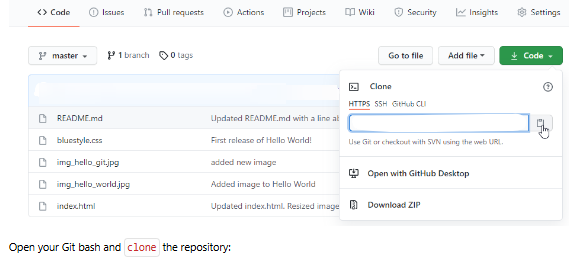
GitHub குளோன் URL
உங்கள் Git bash-ஐத் திறந்து களஞ்சியத்தை குளோன் செய்யவும்:
உதாரணம்
git clone https://github.com/jassifteam-test/jassifteam-test.github.io.git
Cloning into 'jassifteam-test.github.io'...
remote: Enumerating objects: 33, done.
remote: Counting objects: 100% (33/33), done.
remote: Compressing objects: 100% (15/15), done.
remote: Total 33 (delta 18), reused 33 (delta 18), pack-reused 0
Receiving objects: 100% (33/33), 94.79 KiB | 3.16 MiB/s, done.
Resolving deltas: 100% (18/18), done.
உங்கள் கோப்பு முறைமையில் பாருங்கள், குளோன் செய்யப்பட்ட திட்டத்தின் பெயரில் ஒரு புதிய அடைவு இருப்பதை நீங்கள் காண்பீர்கள்:
உதாரணம்
ls
w3schools-test.github.io/குறிப்பு:
குளோன் செய்ய ஒரு குறிப்பிட்ட கோப்புறையைக் குறிப்பிட, களஞ்சிய URL-க்குப் பிறகு கோப்புறையின் பெயரைச் சேர்க்கவும், இது போன்றது: git clone https://github.com/jassifteam-test/jassifteam-test.github.io.git myfolder
புதிய அடைவுக்குச் சென்று, நிலையைச் சரிபார்க்கவும்:
உதாரணம்
cd jassifteam-test.github.io
git status
On branch master
Your branch is up to date with 'origin/master'.

nothing to commit, working tree clean
மேலும், எங்களிடம் முழு களஞ்சியத் தரவு உள்ளது என்பதை உறுதிப்படுத்த பதிவைச் சரிபார்க்கவும்:
உதாரணம்
git log
commit facaeae8fd87dcb63629f108f401aa9c3614d4e6 (HEAD -> master, origin/master, origin/HEAD)
Merge: e7de78f 5a04b6f
Author: jassifteam-test
Date:   Fri Mar 26 15:44:10 2021 +0100

    Merge branch 'master' of https://github.com/jassifteam-test/hello-world

commit e7de78fdefdda51f6f961829fcbdf197e9b926b6
Author: jassifteam-test
Date:   Fri Mar 26 15:37:22 2021 +0100

    Updated index.html. Resized image

.....குளோன் முடிந்தது!
இப்போது அசல் களஞ்சியத்தின் முழு நகல் எங்களிடம் உள்ளது.
ரிமோட்டுகளை கட்டமைத்தல்
அடிப்படையில், எங்களிடம் ஒரு களஞ்சியத்தின் முழு நகல் உள்ளது, அதன் தோற்றத்தை மாற்ற எங்களுக்கு அனுமதி இல்லை.
இந்த Git-இன் ரிமோட்டுகள் எவ்வாறு அமைக்கப்பட்டுள்ளன என்று பார்ப்போம்:
உதாரணம்
git remote -v
origin  https://github.com/jassifteam-test/jassifteam-test.github.io.git (fetch)
origin  https://github.com/jassifteam-test/jassifteam-test.github.io.git (push)
தோற்றம் அசல் "jassifteam-test" களஞ்சியத்திற்கு அமைக்கப்பட்டுள்ளது என்பதை நாங்கள் காண்கிறோம், எங்கள் சொந்த ஃபோர்க்கையும் சேர்க்க விரும்புகிறோம்.
முதலில், அசல் தோற்ற ரிமோட்டை மறுபெயரிடுகிறோம்:
உதாரணம்
git remote rename origin upstream
git remote -v
upstream        https://github.com/jassifteam-test/jassifteam-test.github.io.git (fetch)
upstream        https://github.com/jassifteam-test/jassifteam-test.github.io.git (push)
பின்னர் எங்கள் சொந்த ஃபோர்க்கின் URL-ஐப் பெறுவோம்:
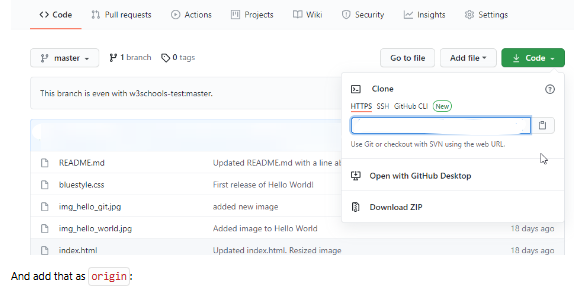
GitHub ஃபோர்க் குளோன் URL
அதை தோற்றமாகச் சேர்க்கவும்:
உதாரணம்
git remote add origin https://github.com/kaijim/jassifteam-test.github.io.git
git remote -v
origin  https://github.com/kaijim/jassifteam-test.github.io.git (fetch)
origin  https://github.com/kaijim/jassifteam-test.github.io.git (push)
upstream        https://github.com/jassifteam-test/jassifteam-test.github.io.git (fetch)
upstream https://github.com/jassifteam-test/jassifteam-test.github.io.git (push)குறிப்பு:
Git பெயரிடும் மரபுகளின்படி, உங்கள் சொந்த களஞ்சியத்தை origin என்றும், நீங்கள் ஃபோர்க் செய்ததை upstream என்றும் பெயரிட பரிந்துரைக்கப்படுகிறது.
இப்போது எங்களிடம் 2 ரிமோட்டுகள் உள்ளன:
origin
எங்கள் சொந்த ஃபோர்க், எங்களுக்கு வாசிப்பு மற்றும் எழுதும் அணுகல் உள்ளது
upstream
அசல், எங்களுக்கு வாசிப்பு-மட்டும் அணுகல் உள்ளது
தயார்!
இப்போது நாங்கள் குறியீட்டில் சில மாற்றங்களைச் செய்யப் போகிறோம். அடுத்த அத்தியாயத்தில், அந்த மாற்றங்களை அசல் களஞ்சியத்திற்கு எவ்வாறு பரிந்துரைக்கிறோம் என்பதைக் க覆盖்போம்.
விரைவு குறிப்பு
குளோன்
களஞ்சியத்தை உள்ளூருக்கு பதிவிறக்கவும்
git clone URLரிமோட்டுகள்
ரிமோட் களஞ்சியங்களைப் பாருங்கள்
git remote -vரிமோட் மறுபெயரிடு
ரிமோட்டை மறுபெயரிடவும்
git remote rename old newரிமோட் சேர்க்க
புதிய ரிமோட்டைச் சேர்க்கவும்
git remote add name URL