GitHub से एक कांटा क्लोन करें
अब हमारे पास अपना स्वयं का कांटा है, लेकिन केवल GitHub पर। इस पर काम जारी रखने के लिए, हम अपने स्थानीय Git में एक क्लोन भी चाहते हैं।
क्लोन एक रिपॉजिटरी की पूरी प्रतिलिपि है, जिसमें सभी रिकॉर्ड और फ़ाइलों के संस्करण शामिल हैं।
मूल रिपॉजिटरी पर वापस जाएं और यूआरएल को क्लोन करने के लिए हरे "कोड" बटन पर क्लिक करें:
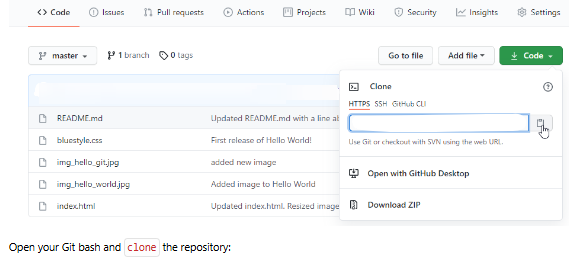
GitHub क्लोन URL
अपना Git बैश खोलें और रिपॉजिटरी को क्लोन करें:
उदाहरण
git clone https://github.com/jassifteam-test/jassifteam-test.github.io.git
Cloning into 'jassifteam-test.github.io'...
remote: Enumerating objects: 33, done.
remote: Counting objects: 100% (33/33), done.
remote: Compressing objects: 100% (15/15), done.
remote: Total 33 (delta 18), reused 33 (delta 18), pack-reused 0
Receiving objects: 100% (33/33), 94.79 KiB | 3.16 MiB/s, done.
Resolving deltas: 100% (18/18), done.
अपने फ़ाइल सिस्टम में देखें और आपको क्लोन प्रोजेक्ट नामक एक नई निर्देशिका दिखाई देगी:
उदाहरण
ls
w3schools-test.github.io/नोट:
क्लोन करना किसी विशिष्ट फ़ोल्डर को निर्दिष्ट करने के लिए, रिपॉजिटरी यूआरएल के बाद फ़ोल्डर का नाम इस तरह जोड़ें:git clone https://github.com/jassifteam-test/jassifteam-test.github.io.git myfolder
नई निर्देशिका पर जाएँ और स्थिति जाँचें:
उदाहरण
cd jassifteam-test.github.io
git status
On branch master
Your branch is up to date with 'origin/master'.

nothing to commit, working tree clean
साथ ही, यह सुनिश्चित करने के लिए लॉग जांचें कि हमारे पास पूर्ण रिपॉजिटरी डेटा है:
उदाहरण
git log
commit facaeae8fd87dcb63629f108f401aa9c3614d4e6 (HEAD -> master, origin/master, origin/HEAD)
Merge: e7de78f 5a04b6f
Author: jassifteam-test
Date:   Fri Mar 26 15:44:10 2021 +0100

    Merge branch 'master' of https://github.com/jassifteam-test/hello-world

commit e7de78fdefdda51f6f961829fcbdf197e9b926b6
Author: jassifteam-test
Date:   Fri Mar 26 15:37:22 2021 +0100

    Updated index.html. Resized image

.....क्लोन हो गया!
अब हमारे पास मूल भंडार की पूरी प्रति है।
रिमोट कॉन्फ़िगर करना
मूलतः, हमारे पास भंडार की पूरी प्रति है और हमें उसका स्वरूप बदलने की अनुमति नहीं है।
आइए देखें कि Git के रिमोट कैसे सेट किए जाते हैं:
उदाहरण
git remote -v
origin  https://github.com/jassifteam-test/jassifteam-test.github.io.git (fetch)
origin  https://github.com/jassifteam-test/jassifteam-test.github.io.git (push)
हम देखते हैं कि मूल मूल "jassifteam-test" रिपॉजिटरी पर सेट है और हम अपना स्वयं का कांटा भी जोड़ना चाहते हैं।
सबसे पहले, हम मूल लुकअप रिमोट का नाम बदलते हैं:
उदाहरण
git remote rename origin upstream
git remote -v
upstream        https://github.com/jassifteam-test/jassifteam-test.github.io.git (fetch)
upstream        https://github.com/jassifteam-test/jassifteam-test.github.io.git (push)
बाद में हमें अपने स्वयं के कांटे का यूआरएल मिलता है:
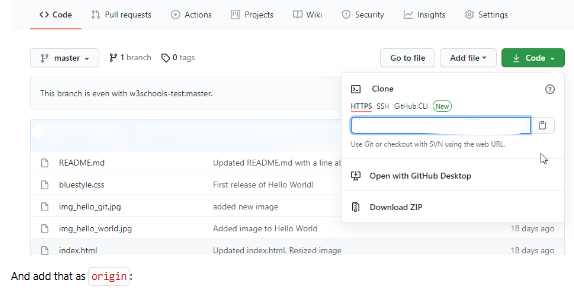
GitHub कांटा क्लोन यूआरएल
इसे लुकअप के रूप में जोड़ें:
उदाहरण
git remote add origin https://github.com/kaijim/jassifteam-test.github.io.git
git remote -v
origin  https://github.com/kaijim/jassifteam-test.github.io.git (fetch)
origin  https://github.com/kaijim/jassifteam-test.github.io.git (push)
upstream        https://github.com/jassifteam-test/jassifteam-test.github.io.git (fetch)
upstream https://github.com/jassifteam-test/jassifteam-test.github.io.git (push)नोट:
Git , originइसके अलावा, आपने क्या काटाupstreamनाम देने की भी अनुशंसा की गयी है
अब हमारे पास 2 रिमोट हैं:
origin
हमारे अपने कांटे के लिए, हमारे पास पढ़ने और लिखने की पहुंच है
upstream
मूल, हमारे पास केवल-पढ़ने के लिए पहुंच है
ठाकौं!
अब हम कोड में कुछ बदलाव करने जा रहे हैं। अगले अध्याय में, हम देखेंगे कि हम मूल रिपॉजिटरी में उन परिवर्तनों की अनुशंसा कैसे करते हैं।
त्वरित संदर्भ
क्लोन
रिपॉजिटरी को स्थानीय रूप से डाउनलोड करें
git clone URLदूरस्थ
दूरस्थ रिपॉजिटरी की जाँच करें
git remote -vरिमोट का नाम बदलें
रिमोट का नाम बदलें
git remote rename old newरिमोट जोड़ना
एक नया रिमोट जोड़ें
git remote add name URL